Collision detection shows you, as it happens, which teammates have a ticket open and whether they're writing a reply. It appears in the ticket list and on the ticket itself, so two people don't end up answering the same customer.
It's on every CXdesk plan and needs no setup.
Why it matters
Everyone in a shared inbox sees the same new email. Two agents open it a minute apart, both start typing, and the customer gets two replies, sometimes saying different things. The customer sees a team that isn't talking to each other, and one agent has wasted their time.
Plenty of teams handle this with a rule like "say in chat before you take one". That holds up until the queue gets busy and people stop posting. CXdesk shows the same thing automatically, so nobody has to remember to announce it.
In the ticket list
When a teammate has a ticket open, its row shows an eye icon and their first name. Once they start writing a reply, the eye turns into a pink pencil. If more than one person has it open, hover over the name to see everyone.
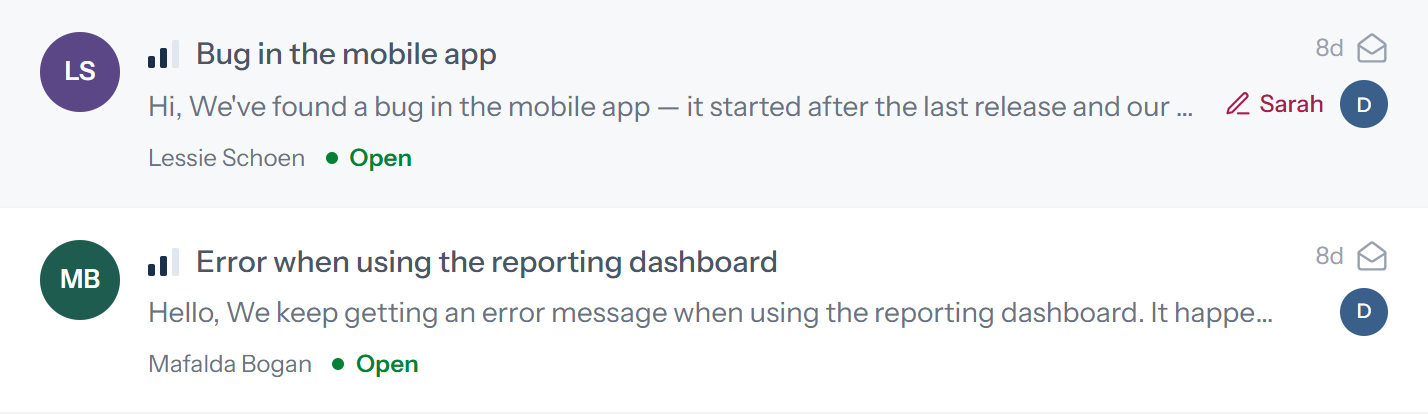
You can pass over tickets someone is already handling without opening them.
On the ticket
Next to the subject at the top of the ticket, a badge shows the avatars of teammates who have it open, with a short summary like "Sarah is viewing". When one of them starts writing a reply, it changes to "Sarah is replying" and turns pink.

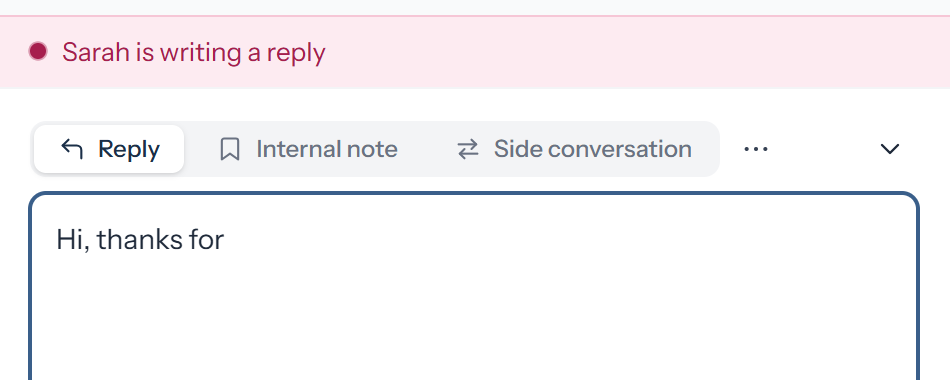
Above the reply box, a notice says what they're doing, either "Sarah is writing a reply" or "Sarah is writing an internal note". If you're writing a reply too, the notice is highlighted, since that's exactly when a duplicate answer happens.
When your teammate sends first
If a teammate sends a reply while you have the ticket open, their message appears in the conversation along with "Sarah just replied."
If you were halfway through your own reply, the notice reads "Sarah just replied. Read it before you send yours." Your draft stays put, so you can add to their answer, rework yours or throw it away.
Nothing gets locked
CXdesk doesn't lock a ticket to whoever opened it first, and anyone can still reply. Locks cause their own trouble: a ticket gets stuck because the person who opened it went to lunch. Your team can see who's on what and sort it out between themselves.
What counts as viewing and writing
A teammate is viewing when they have the ticket open. They're writing once they've typed something in the reply box; opening the box without typing doesn't count. They drop off when they move to another ticket or close CXdesk, and if their connection cuts out, they disappear within about a minute.
Common questions
Do customers see any of this?
No. Only your team sees it, inside CXdesk.
Does it work across teams?
Yes. Anyone in your workspace who has the ticket open shows up, whichever team they're on.
Does it show what my teammate is typing?
No, only that they're writing.
Which plans include it?
All of them.
If deadlines are your next worry, read how SLA policies work in CXdesk.